MoPub Banner

Smaato One More

Inmobi Again

...

MobFox Interstitial Ad

MoPub Full Screen Ad

Smaato Ad Unit

Wednesday, August 15, 2012

Nimbuzz PC Client with Chatrooms - Chat rooms


Nimbuzz offers Chatrooms in Symbian and Java Phones, not in Android / iPhone (yet). Nimbuzz PC Client 2.2 version released with Chat rooms, but Its not available in 2.3 version.

Android users can install Nimbuzz Java Client (The must use Java Launchers for Android - Perform a Google Search please)

This post is for PC client chat room lovers. Download Old Nimbuzz PC Client with CHAT ROOMS

Let me know if the link is not working. Once you Install, If there is a software update Pop-Up comes, Dont give OK.

Keywords : Nimbuzz old version, Nimbuzz PC Client, Nimbuzz PC client with Chat rooms, Chatrooms, chat rooms


Wednesday, June 20, 2012

Mobile Advertisement


<!-- URTAK EMBED CODE START -->
<script src="https://d39v39m55yawr.cloudfront.net/assets/clr.js" type='text/javascript'></script>
<div
  data-publication-key = '56f31f33cf938007ac5dc012380cd97e'
  data-post-title      = 'YOUR_POST_TITLE'
  data-post-permalink  = 'YOUR_PERMALINK'
  data-post-id         = 'YOUR_POST_ID'
  data-post-created    = 'YOUR_PUBLISHING_DATE'
>
</div>
<!-- URTAK EMBED CODE END -->

Tuesday, June 5, 2012

Installing Development XAP in WP7x (Mango)

If you like to Install the XAP file (Windows Phone Executable) for the first time on a newly bought windows phone, you need to open Application deployment from your Run window. (I am assuming you had installed Windows Phone SDK and Zune Software Installed). 


The XAP Installer will show up. you can either choose Windows phone device or emulator in the drop down box.


Select windows Phone device and browse the XAP file which you received from Development.

Connect the Phone in the PC with USB Cable

Press the Unlock button in the Phone (Application will not be Installed if the phone is locked)

Press Deploy Button and the Application will be deployed.

@ this time, you may receive Error messages like "failed to connect to device as it is developer locked"

Solution for this: 

Open the Below Phone registration app from the blow path

64-bit: C:\Program Files (x86)\Microsoft SDKs\Windows Phone\v7.1\Tools\Phone Registration
32-bit: C:\Program Files\Microsoft SDKs\Windows Phone\v7.1\Tools\Phone Registration


Enter your registered windows live developer account (In INR its about 4K, and your management must be having one. Check with the Lead or Test manager)

Enter the ID and Password, and Press Register, the Application will be automatically register your phone. make sure you set a name for your phone in Zune software.

Now open Application deployment again and Press Deploy button (after browsing the right XAP file path), Walla, you are Done.

Check the Phone and your XAP will be Installed at this point in time.

Sunday, May 27, 2012

Skype4Py


This Script searches for a Name / Username , more examples : https://github.com/stigkj/Skype4Py/tree/master/examples


#!/usr/bin/env python

import Skype4Py

print 'Starting...'
# Instatinate Skype object, all further actions are done
# using this object.
skype = Skype4Py.Skype()

# Start Skype if it's not already running.
if not skype.Client.IsRunning:
    skype.Client.Start()

# Set our application name.
skype.FriendlyName = 'Skype4Py_Example'

# Attach to Skype. This may cause Skype to open a confirmation
# dialog.
skype.Attach()

# Set up an event handler.
def new_skype_status(status):
    # If Skype is closed and reopened, it informs us about it
    # so we can reattach.
    if status == Skype4Py.apiAttachAvailable:
        skype.Attach()
skype.OnAttachmentStatus = new_skype_status

# Search for users and display their Skype name, full name
# and country.
for user in skype.SearchForUsers('ravindran'):
    print user.Handle, user.FullName, user.Country

Sunday, May 20, 2012

Issue ADB command anywhere u want


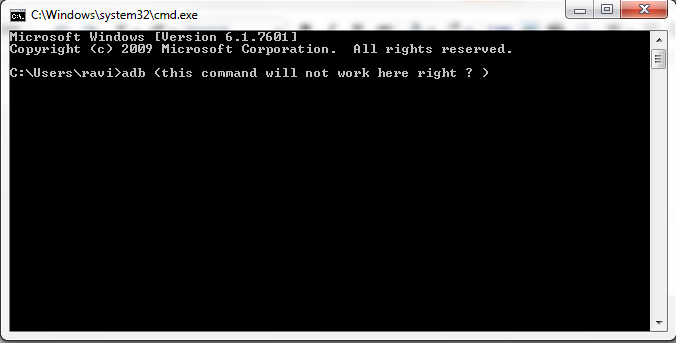
To use the adb command, you need to always navigate to c:\Program Files\Android\android-sdk\platform-tools and run adb logcat or adb devices etc.

But a simple tips, u never need to navigate to the platform-tools folder manually. Simply add the platform tools path as your System Variable (in Environment Variables - u want me to tell you where is it ? :) )


Do that, and Walla, u can issue adb command anywhere in the command prompt and u never need to navigate manually.  If you dont have a PATH Variable already in the System variables, Create a New One. 
If this trick doesn't work, then add the same path in the User variables as well. U must be having the Path variable in the User variables. (u must have installed JAVA or Python right) 


If you are facing any problems, please comment !!!


Tuesday, May 15, 2012

Sikuli Automation on a E-Com Site


In Sikuli, you can automation anything on your screen. you can download Sikuli from here : http://sikuli.org/

In Sikuli you can directly apply python code.

Its a best open source GUI Automation tool I ever experienced.

You can even automation Android Applications using Sikuli. I had posted a similar video in youtube couple of years ago.


Friday, May 11, 2012

Mobile QA Zone

Mobile QA Zone (http://www.mobileqazone.com/) run by my friend Mr.Anurag is one of its kind in Mobile testing Industry.


This is their Objective :

The Objective of this community is to provide online platform for
all Software testers especially from Mobile/Telecom domain who are
consistently facing need to have a platform for this new unexplored
domain. The Objective is also to provide Opportunity for all
Software Testers to explore this domain.

They also have something called "Tea time with Testers", another Interesting Initiative.


We are roam around there many times a day, replying each others practical mobile application testing problems. I even announced a contest & handed over PSPs to few testers.

What more, Just jump In and sign up : http://www.mobileqazone.com